HTML, The Foundation of the Web

HTML, or HyperText Markup Language, is the fundamental building block of the World Wide Web. Every website you visit, from simple blogs to complex web applications, ultimately renders as HTML in your browser. Understanding HTML is the essential first step for anyone learning web development.
HTML, The Foundation of the Web
HTML is not a programming language but a markup language. It uses tags to structure content, indicating what elements are headings, paragraphs, links, images, and more. This structure allows browsers to display content appropriately and enables assistive technologies like screen readers to interpret pages for users with disabilities.
The basic syntax is simple: elements are enclosed in angle brackets. Most elements have opening and closing tags with content between them: <p>This is a paragraph.</p>. Some elements, called void elements, are self-closing: <img src="image.jpg" alt="Description">. Attributes within opening tags provide additional information about elements.
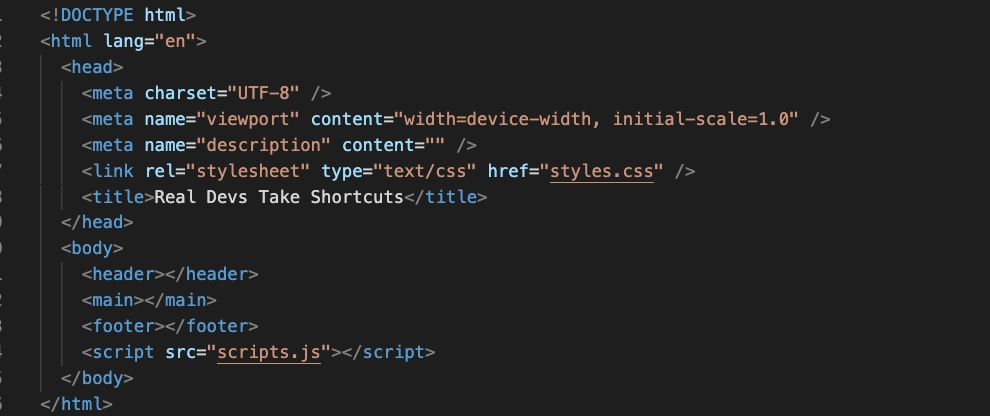
HTML documents follow a standard structure. The <!DOCTYPE html> declaration tells browsers which HTML version to expect. The <html> element wraps entire document. <head> contains metadata—page title, character encoding, links to stylesheets—not displayed on page. <body> contains visible content. This basic structure underlies every web page.
Semantic HTML uses elements that convey meaning about their content. <header>, <nav>, <main>, <article>, <section>, <aside>, <footer> describe page regions. <h1> through <h6> indicate heading hierarchy. <ul> and <ol> create lists. Semantic markup improves accessibility, search engine optimization, and code maintainability.
Links connect the web. The <a> element with href attribute creates hyperlinks, enabling navigation between pages. This simple capability—clicking text or image to access related content—is what makes the web “web-like.” Without links, web would be collection of isolated documents.
Images enhance visual communication. <img> embeds images; src specifies source, alt provides text description for accessibility when images cannot load or users cannot see them. Modern HTML also includes <picture> for responsive images, allowing different image versions for different screen sizes.
Forms collect user input. <form> wraps input elements: <input> for text, passwords, checkboxes, radio buttons; <textarea> for multiline text; <select> for dropdowns; <button> for submission. Forms enable search, login, registration, comments, purchases—virtually all user interaction with websites.
Tables organize data. <table> with <thead>, <tbody>, <tr> (rows), <th> (headers), <td> (cells) present tabular information. While tables were once used for page layout (bad practice), they should only display tabular data. CSS handles layout.
Multimedia elements enrich experience. <video> and <audio> embed media with controls for playback. <iframe> embeds other web pages, enabling integration of YouTube videos, maps, and external content. These elements make web pages dynamic and engaging.
HTML5, the current major version, introduced semantic elements, native audio/video, canvas for drawing, and improved form controls. It also added APIs for offline applications, drag-and-drop, and browser history manipulation. HTML5 transformed web from document platform to application platform.
Accessibility is built into HTML. Using semantic elements, providing alt text for images, labeling form inputs with <label>, and structuring content with proper heading hierarchy ensures people using assistive technologies can navigate and understand content. Accessible HTML is better HTML for everyone.
Validation ensures code quality. The W3C validator checks HTML against standards, identifying errors and potential issues. Valid HTML is more likely to render consistently across browsers and devices. While perfect validation isn’t always necessary, understanding and fixing errors improves reliability.
HTML works with CSS and JavaScript. CSS styles HTML elements—colors, layout, typography. JavaScript adds interactivity—responding to user actions, manipulating content dynamically. HTML provides structure; CSS provides presentation; JavaScript provides behavior. These three technologies together create modern web experiences.
Learning HTML means understanding elements, attributes, nesting, and document structure. It means thinking about content meaning, not just appearance. It means building foundation upon which everything else depends. HTML is simple enough to learn quickly yet deep enough to reward continued study.
Every web developer, regardless of specialty, must understand HTML. It is the common language of the web, the medium through which content reaches users. Mastering HTML means mastering the web’s fundamental building block.